
Arcane Legends is a massive multiplayer online role playing game (MMORPG) available for Android (and iOS users). While playing the game for the first time just a couple of weeks ago, finding how to add players to your friends list can be difficult. This tutorial will help explain how to view your friends list, as well as teach you how to add and accept players so that they are displayed as either online or offline on your friend list.
How to add friends to your friend list in Arcane Legends :
- Boot up the Arcane Legends game.
- To the top-left corner of the screen while you’re in the game, select the stats box with your avatar.
- On the new screen, to the bottom there should be a box called “social” (see image below). Select it.
- Find the “add friends” option located at the top of the screen and select it.
- Type in the correct player’s username and proceed.
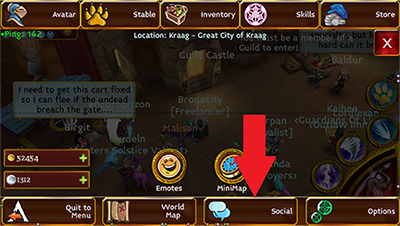
Image credit : Spacetime Studios (game developer).
How to accept friend request invitations in Arcane Legends :
- Boot up the Arcane Legends game like before.
- Follow the steps from the previous step by step guide, and stop after completing step 3.
- That’s it – your friend list should be the default tab (if a different tab is active, choose “my friends”).
Note : it is also possible to ignore players. The last option on the friend list screen allows players to add usernames to their ignore list.
